Stock Search Deep Dive
# Stock Search Deep Dive
The Stock Search tool filters stocks by quality, returns, and other metrics to help you find investment candidates that match your criteria.
## Key Points
- **Less is more**: Start with 1-2 filters and add more only if needed
- **Start broad, go narrow**: Review results before adding restrictions
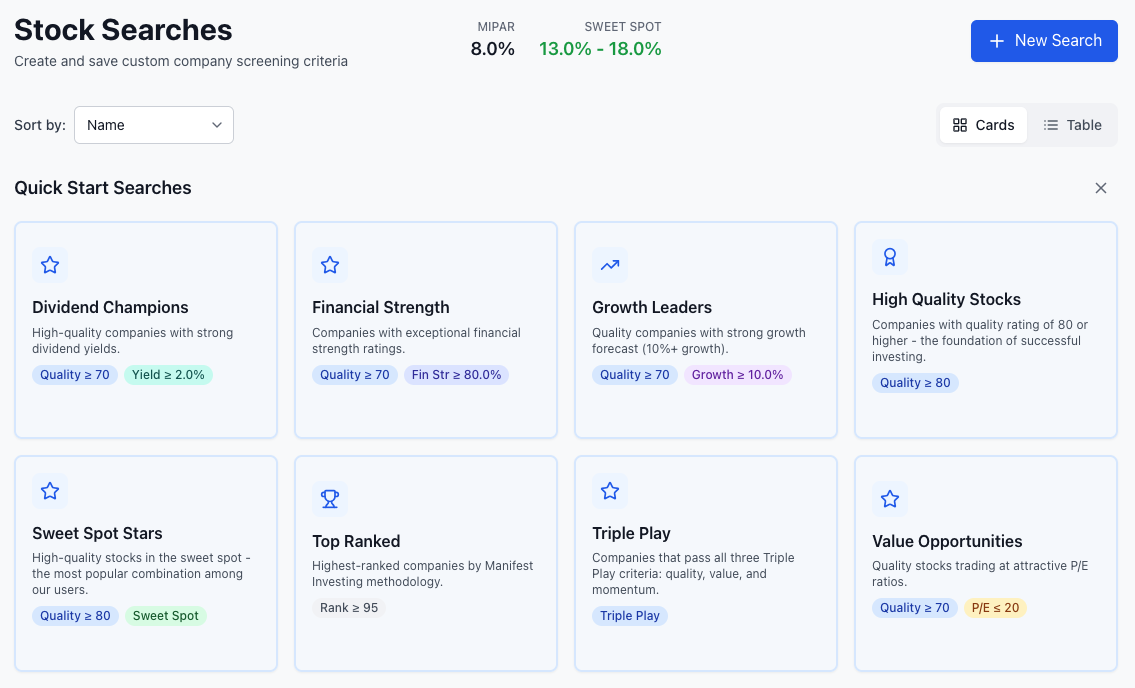
- **Use Quick Screens**: Sweet Spot Stars gives instant quality results
- **Save what works**: Build a library of successful screens
## Getting Started
Access Stock Search via **Stock Screen** in the main navigation:
- **Stock Screens**: Browse Quick Screens and your Saved Searches
- **Build Custom Screen**: Create screens with all available filters
**Important**: Start simple. One or two filters often produces better results than a complex screen with many restrictions. You can always narrow down if you get too many matches.
## Quick Screens
The Quick Screens tab offers pre-built searches for common investment goals. **Sweet Spot Stars** is the most popular — it finds high-quality stocks (Quality ≥ 80) in the Sweet Spot range.
Click any Quick Screen to instantly see matching stocks.
## Available Filters
Stock Search provides 13 metric filters plus special toggles and sector/industry filtering.
### Toggle Filters
| Filter | What It Does |
|--------|-------------|
| **Sweet Spot** | Auto-sets PAR range to MIPAR+5% to MIPAR+10% |
| **Triple Play** | Filters for high PAR, Quality, and PROVE combined |
### Sector & Industry
Filter by economic sector and/or specific industries. Select one or more sectors, then optionally narrow to specific industries within those sectors.
### Metric Filters
All metric filters accept minimum and/or maximum values:
| Metric | Description |
|--------|-------------|
| **PAR** | Projected Annual Return (%) |
| **Quality** | Overall quality score (0-100) |
| **PROVE** | Projected Return on Value (%) |
| **Manifest Rank** | Overall ranking percentile (0-100) |
| **Financial Strength** | Balance sheet health (0-100%) |
| **Growth Forecast** | Projected sales growth (%) |
| **Revenue (TTM)** | Trailing twelve months revenue |
| **EPS Stability** | Earnings consistency score (0-100) |
| **% From 52 Week Low** | Distance from yearly low (%) |
| **RSI** | Relative Strength Index, momentum (0-100) |
| **Projected Yield** | Expected dividend yield (%) |
| **Core Score** | Core investment quality metric |
| **Current Price** | Stock price per share |
## Building Effective Screens
### The "Less is More" Approach
1. **Start with one filter**: Try Quality > 70 or enable Sweet Spot
2. **Review results**: See how many companies match
3. **Add another filter only if needed**: Too many results? Add one more criterion
4. **Repeat until manageable**: Stop when you have a reviewable list
### Example: Finding Quality Stocks
**Step 1** — Start simple:
- Quality: > 70
- *Result: ~200 companies*
**Step 2** — Still too many? Add PAR focus:
- Quality: > 70
- PAR: > 12%
- *Result: ~80 companies*
**Step 3** — Want fewer? Add one more:
- Quality: > 70
- PAR: > 12%
- Financial Strength: > 75%
- *Result: ~40 companies*
**Stop here.** 40 companies is a reviewable list. Adding more filters risks eliminating good candidates.
### Sweet Spot Strategy
The simplest effective screen: Enable **Sweet Spot** and set **Quality > 80**. This targets the optimal PAR range with high-quality companies — often the best starting point.
## Filter Guidelines
### Quality Score
| Range | Level | Typical Use |
|-------|-------|-------------|
| 80+ | Excellent | Core holdings, conservative portfolios |
| 65-80 | Good | Balanced approach |
| 50-65 | Average | Speculative positions only |
| <50 | Below Average | Generally avoid |
### Financial Strength
| Range | Strength | Guidance |
|-------|----------|----------|
| 80%+ | Excellent | Ideal for core holdings |
| 60-80% | Good | Acceptable for most portfolios |
| 40-60% | Moderate | Use caution, smaller positions |
| <40% | Weak | Generally avoid |
### PAR vs. MIPAR
- **MIPAR+5% to MIPAR+10%**: Sweet Spot — ideal buying zone
- **Above MIPAR+10%**: Investigate thoroughly — projections may be optimistic
- **Below MIPAR+5%**: Likely overpriced relative to market expectations
## Common Mistakes
### Over-Filtering
The most common mistake. If your screen returns few or no results, remove filters rather than loosening thresholds. Quality candidates get eliminated by too many restrictions.
### Ignoring MIPAR Context
PAR targets should relate to current MIPAR. A 15% PAR means different things when MIPAR is 8% vs. 12%. Always consider PAR relative to market conditions.
### Chasing High PAR
Don't sacrifice quality for high PAR. A 25% PAR with 45 Quality often signals problems with the underlying projections.
## Saving and Managing Screens
- **Name descriptively**: "Quality 70+ Sweet Spot" beats "My Screen"
- **Save successful screens**: Build a library for different market conditions
- **Review periodically**: MIPAR changes daily, affecting PAR-based screens
## Learn More
- [Stock Analysis Fundamentals](/guide/getting-started/reading-company-page) - Evaluate screen results
- [Portfolio Construction](/guide/making-decisions/portfolio-design) - Turn screens into portfolio additions
- [MIPAR and Market Timing](/guide/core-concepts/mipar) - Understand market context
- [Quality Rating Deep Dive](/guide/core-concepts/quality-rating) - Master the quality system