Alerts & Notifications
# Alerts & Notifications
Create custom alerts to automatically notify you when investment opportunities appear or when your holdings need attention.
## Setting Up Stock Alerts
### Creating an Alert
1. Navigate to any company's detail page
2. Click the **Alert** button (bell icon) in the header
3. Configure your alert conditions
4. Click **Create Alert**
### Available Alert Conditions
You can set alerts for multiple metrics on a single stock:
**Sweet Spot Alerts**
- **Enters Sweet Spot**: Notifies when PAR reaches MIPAR+5% to MIPAR+10%
- **Exits Sweet Spot**: Notifies when PAR leaves the Sweet Spot range
**Quality Alerts**
- Quality rises above a threshold (e.g., 80)
- Quality falls below a threshold (e.g., 65)
**PAR Alerts**
- PAR rises above a target percentage
- PAR falls below a target percentage
**Other Metrics**
- Financial Strength changes
- Growth Forecast thresholds
- EPS Predictability changes
- RSI (momentum) thresholds
- Audited data updates
The alert form shows current values for each metric, so you can set meaningful thresholds.
## Managing Your Alerts
### Alerts Page
Click **Alerts** in the main navigation to see all your alerts.
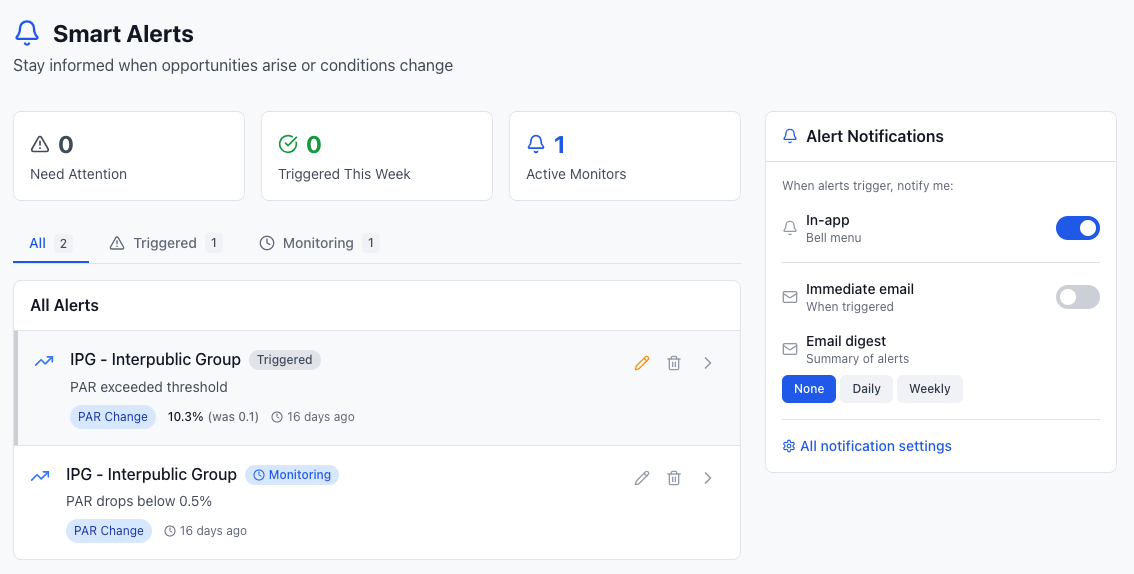
The Alerts page shows:
- **Need Attention**: Alerts that have triggered and haven't been reviewed
- **Triggered This Week**: Recent alert activity
- **Active Monitors**: Alerts still watching for conditions
### Alert States
| State | What It Means | Actions |
|-------|--------------|--------|
| **Triggered (New)** | Condition was met, needs review | Acknowledge, Edit, or Delete |
| **Triggered (Viewed)** | You've seen this alert | Reset to monitor again, or Delete |
| **Monitoring** | Actively watching for condition | Edit or Delete |
### Acknowledging Alerts
When an alert triggers, click the eye icon to acknowledge you've seen it. This moves it from "Needs Attention" to your reviewed list.
To start monitoring again after a trigger, click **Reset** (or **Edit** if the condition is still met).
## Tips for Success
**Start with Sweet Spot Alerts**: The most useful alerts notify you when quality stocks enter the buying zone.
**Avoid Alert Fatigue**: Set meaningful thresholds. Don't alert on every small change.
**Review Regularly**: Check your Alerts page weekly to acknowledge triggers and clean up old alerts.
**Use Quality Alerts Defensively**: Set alerts for quality drops on stocks you own to catch problems early.
## Email Notifications
Alerts can send email notifications when conditions are met. Make sure your email is verified in your account settings to receive alerts.
## Learn More
- [Create a Dashboard](/guide/using-the-platform/dashboards) to track stocks you want to alert on
- [Understanding PAR](/guide/core-concepts/par) to set meaningful alert thresholds
- [Quality Rating Basics](/guide/core-concepts/quality-rating) to understand quality change alerts