Your First Stock Search
# Your First Stock Search
Find quality companies in the Sweet Spot using Manifest's screening tools.
## What You'll Accomplish
You'll create your first stock screen to identify quality companies trading in the Sweet Spot, the ideal buying zone where stocks offer attractive returns without excessive risk.
## Step-by-Step Instructions
### 1. Access Stock Screens
- Click **Stock Screen** in the main navigation
- Select **Stock Screens** to see your options
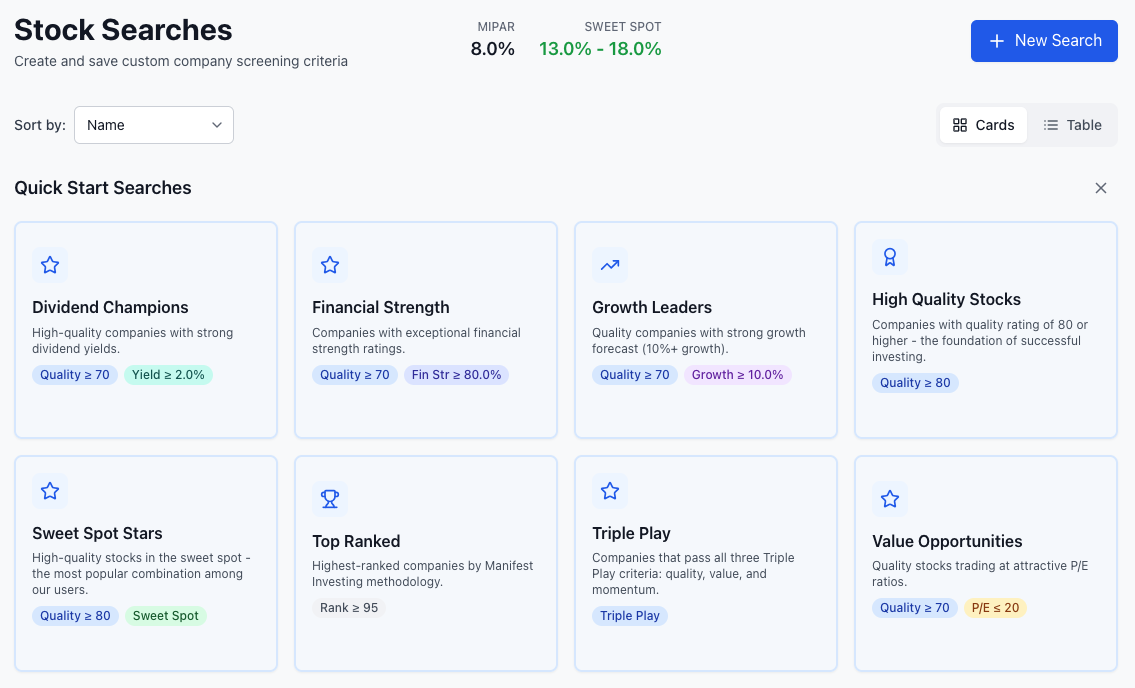
### 2. Start with Sweet Spot Stars
The **Quick Screens** tab shows pre-built searches. Look for **Sweet Spot Stars**:
> High-quality stocks in the sweet spot — the most popular combination among our users.
>
> Filters: **Quality ≥ 80** + **Sweet Spot**
Click it to instantly see matching stocks. This is the fastest way to find investment candidates.
### 3. Review Your Results
The results show matching stocks with:
- Company name and symbol
- Current price
- Quality score (color-coded: blue for 80+, green for 65-80)
- PAR percentage (color-coded for Sweet Spot)
- Growth forecast
Click any stock to view its detailed company page.
### 4. Build a Custom Screen (Optional)
Want more control? Select **Build Custom Screen** from the menu to access all filters:
| Filter | What It Does |
|--------|-------------|
| **Sweet Spot** | Toggle to auto-set PAR to MIPAR+5% to MIPAR+10% |
| **PAR Range** | Set minimum and maximum Projected Annual Return |
| **Quality** | Set minimum and maximum Quality score |
The right sidebar shows current MIPAR and the Sweet Spot range for reference.
Click **Add Criteria** for additional filters like Financial Strength, Growth Forecast, or Projected Yield.
### 5. Save Your Screen
To save a custom search:
1. After running a search, give it a name
2. Your saved screens appear in the **Saved Searches** tab
3. Click **Run** to execute a saved search anytime
## Tips for Success
**Start Simple**: Sweet Spot Stars is perfect for beginners — it combines the two most important filters automatically.
**Understand MIPAR**: This benchmark changes daily. The Sweet Spot filters automatically adjust to current market conditions.
**Focus on Quality**: Never compromise on Quality. Poor-quality companies rarely make good investments regardless of their PAR.
**Export Results**: Click the CSV export button to download results for further analysis.
## What Your Results Mean
Stocks appearing in your Sweet Spot screen represent quality companies trading at attractive valuations. They offer:
- Projected returns 5-10% above the market average (MIPAR)
- Good to excellent quality ratings
- Reasonable risk levels
These become candidates for deeper analysis.
## Learn More
- [Analyze Your First Stock](/guide/getting-started/reading-company-page) - Dive deeper into one screening result
- [Build a Watchlist](/guide/using-the-platform/dashboards) - Track your screening results
- [Advanced Screening](/guide/using-the-platform/stock-search) - Learn all screening options